Fixing Vulnerabilities in Docker Images
🔧 Fixing Vulnerabilities in Docker Images
Now that we have scanned our vulnerable image with Docker Scout, let’s fix the identified security issues.
1️⃣ Analyzing the Vulnerable Dockerfile
Let’s examine the vulnerabilities in our Dockerfile.vulnerable:
# Build stage
# Using Node.js 12.22.0 which has CVE-2021-22883 (OpenSSL vulnerabilities)
FROM node:12.22.0-alpine as build

# Production stage
# Using Nginx 1.14.0 which has CVE-2019-9516 (HTTP/2 DoS vulnerability)
FROM nginx:1.14.0-alpine

# Install additional packages - using a vulnerable version of curl
# CVE-2018-1000120 in curl 7.60.0
RUN apk add --no-cache curl openssl
Docker Scout identified several vulnerabilities:
- Node.js 12.22.0: Contains OpenSSL vulnerabilities (CVE-2021-22883)
- Nginx 1.14.0: Contains HTTP/2 DoS vulnerability (CVE-2019-9516)
- curl: Contains vulnerability CVE-2018-1000120
2️⃣ Creating a Fixed Dockerfile
Let’s create a fixed version of our Dockerfile:
cat << 'EOF' > Dockerfile.fixed
# Build stage
# Updated to Node.js 20 (latest LTS) to fix vulnerabilities
FROM node:20-alpine as build
WORKDIR /app
ENV DISABLE_ESLINT_PLUGIN=true

# Copy package files and install dependencies
COPY package*.json ./
RUN npm install --no-package-lock

# Copy the rest of the application code
COPY . .
RUN npm run build

# Production stage
# Using a more recent Alpine version with fewer vulnerabilities
FROM nginx:stable-alpine

# Copy the build output to replace the default nginx contents
COPY --from=build /app/build /usr/share/nginx/html

# Copy nginx configuration
COPY nginx.conf /etc/nginx/conf.d/default.conf

# Update packages before installing to get latest security patches
RUN apk update && \
    apk upgrade && \
    apk add --no-cache curl openssl

# Expose port
EXPOSE 80

# Start nginx with non-root user for better security
# Create a non-root user to run nginx
RUN adduser -D -H -u 1000 -s /sbin/nologin nginx-user && \
    chown -R nginx-user:nginx-user /var/cache/nginx /etc/nginx/conf.d

USER nginx-user

CMD ["nginx", "-g", "daemon off;"]
EOF
Key fixes:
- Updated Node.js from 12.22.0 to 20 (latest LTS)
- Updated Nginx from 1.14.0 to 1.25 with Alpine 3.18 (more recent base)
- Using
apk update && apk upgradeto ensure all packages are updated to latest available versions - Added security hardening by running nginx as a non-root user
3️⃣ Build and Scan the Fixed Image
Build the image using the fixed Dockerfile:
docker build -t $DOCKER_USERNAME/rent-a-room:fixed -f Dockerfile.fixed .Run another Docker Scout scan to confirm our major issues are fixed:
docker scout cves $DOCKER_USERNAME/rent-a-room:fixedYou may still see some vulnerabilities in the scan results. This is common in container security - even the latest available packages in a repository might have known vulnerabilities that haven’t been patched yet.
Understanding Remaining Vulnerabilities
Even in our “fixed” image, you might see vulnerabilities in:
- expat: A dependency of the nginx Alpine image
- curl: The latest available version in the Alpine repository
- musl: A core Alpine library
- busybox: A core Alpine utility package
These vulnerabilities represent the reality of container security - there’s often a balance between:
- Using the latest available packages
- Waiting for security patches to be available in the repository
- Accepting some level of risk for non-critical vulnerabilities
4️⃣ Compare the Results
Let’s compare the vulnerability scan results between the vulnerable and fixed images:
docker scout compare $DOCKER_USERNAME/rent-a-room:vulnerable --to $DOCKER_USERNAME/rent-a-room:fixed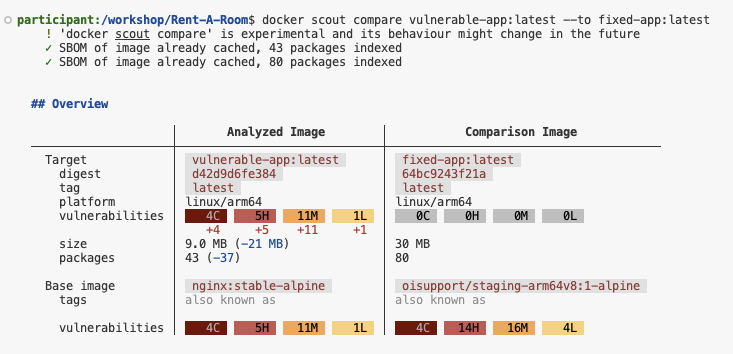
This will show you a side-by-side comparison of vulnerabilities that were remediated.
5️⃣ Risk Assessment and Mitigation Strategies
When dealing with remaining vulnerabilities, consider these strategies:
- Assess the severity and exploitability - Critical vulnerabilities in exposed packages need immediate attention
- Use vulnerability suppression - For vulnerabilities you’ve assessed as low risk
- Consider alternative base images - Some distributions patch vulnerabilities faster than others
- Implement defense in depth - Use network policies, runtime protection, and least privilege principles
6️⃣ Best Practices for Secure Dockerfiles
| Best Practice | Description |
|---|---|
| Use Official Images | Always use official Docker images as base images |
| Use Specific Tags | Avoid using latest tag; use specific version tags |
| Keep Base Images Updated | Regularly update base images to include security patches |
| Minimize Image Layers | Combine RUN commands to reduce layers and attack surface |
| Use Multi-stage Builds | Separate build and runtime environments |
| Specify Package Versions | Pin package versions to avoid unexpected updates |
| Scan Images Regularly | Integrate Docker Scout into your CI/CD pipeline |
📌 Next Steps
Now that our image is secure, let’s automate vulnerability scanning in AWS CodePipeline!
Move to the next section for CI/CD integration. 🚀