Scanning Docker Images with Docker Scout
🔍 Scanning Docker Images with Docker Scout
Now that we understand what Docker Scout is, let’s scan our Docker images for security vulnerabilities.
1️⃣ Install Docker Scout
Ensure Docker Scout is installed by running:
docker scout versionIf it’s not installed, update Docker to the latest version or manually install it:
curl -fsSL https://raw.githubusercontent.com/docker/scout-cli/main/install.sh -o install-scout.sh
sh install-scout.sh
2️⃣ Create a Vulnerable Dockerfile for Testing
Let’s create a Dockerfile with known vulnerabilities to demonstrate Docker Scout’s capabilities:
cat << 'EOF' > Dockerfile.vulnerable
# Build stage
# Using Node.js 12.22.0 which has CVE-2021-22883 (OpenSSL vulnerabilities)
FROM node:12.22.0-alpine as build
WORKDIR /app
ENV DISABLE_ESLINT_PLUGIN=true

# Copy package files and install dependencies
COPY package*.json ./
RUN npm install --no-package-lock --legacy-peer-deps

# Copy the rest of the application code
COPY . .
RUN npm run build

# Production stage
# Using Nginx 1.14.0 which has CVE-2019-9516 (HTTP/2 DoS vulnerability)
FROM nginx:1.14.0-alpine

# Copy the build output to replace the default nginx contents
COPY --from=build /app/build /usr/share/nginx/html

# Copy nginx configuration
COPY nginx.conf /etc/nginx/conf.d/default.conf

# Install additional packages - using a vulnerable version of curl
# CVE-2018-1000120 in curl 7.60.0
RUN apk add --no-cache curl openssl

# Expose port
EXPOSE 80

# Start nginx
CMD ["nginx", "-g", "daemon off;"]
EOF
This Dockerfile intentionally uses:
- Node.js 12.22.0 with known OpenSSL vulnerabilities
- Nginx 1.14.0 with HTTP/2 DoS vulnerability
- A vulnerable version of curl
3️⃣ Build the Vulnerable Image
Build the image using the vulnerable Dockerfile:
docker build -t $DOCKER_USERNAME/rent-a-room:vulnerable -f Dockerfile.vulnerable .4️⃣ Scan the Vulnerable Image with Docker Scout
Now let’s scan our vulnerable image:
docker scout quickview $DOCKER_USERNAME/rent-a-room:vulnerable🔹 This will display a summary of vulnerabilities in the image.
🔹 To get a detailed report, run:
docker scout cves $DOCKER_USERNAME/rent-a-room:vulnerableExample Output:
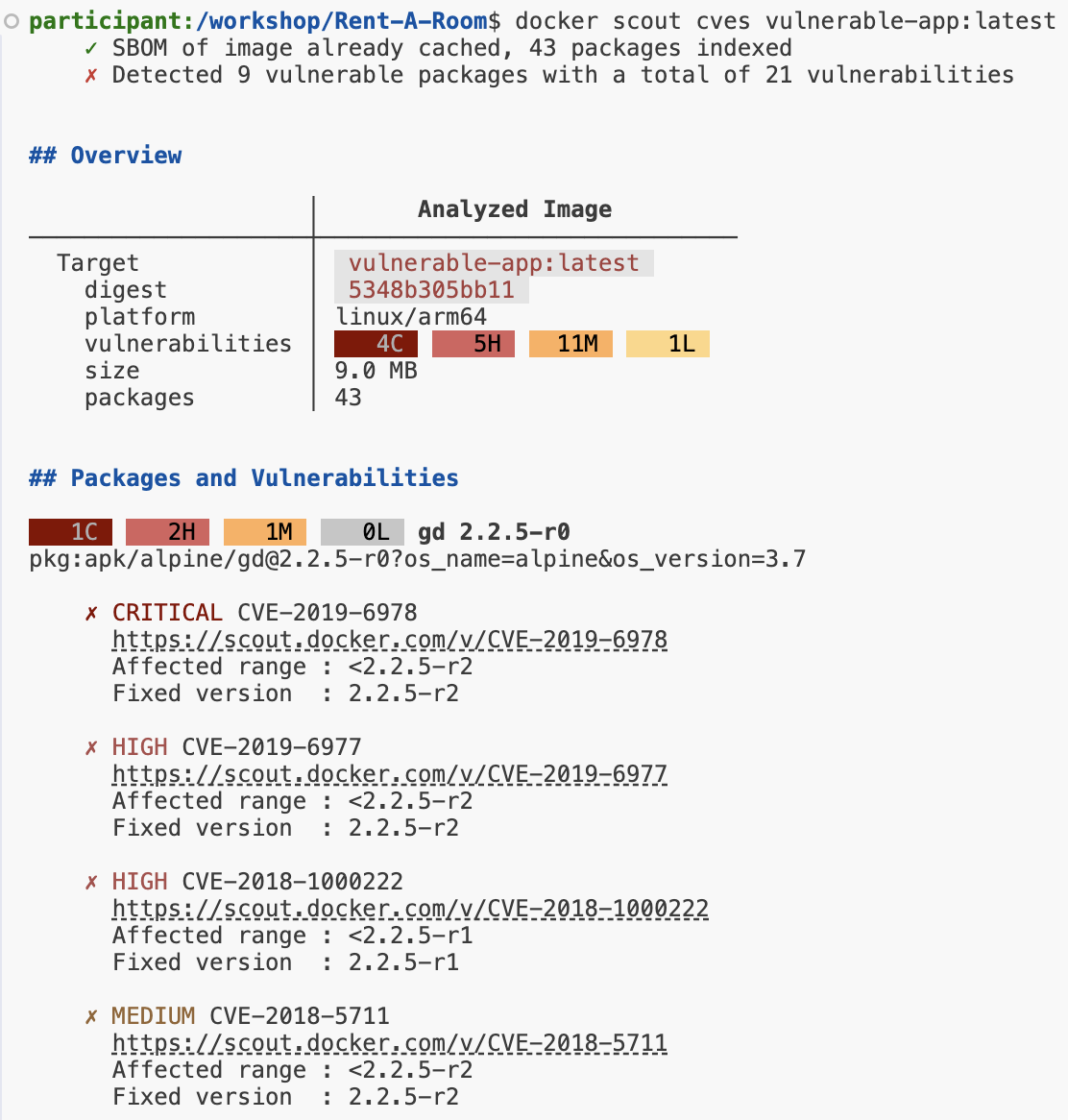
🔹 Each outcome is a link to Docker Scout, click to see more
5️⃣ Understanding the Output
| Column | Description |
|---|---|
| CVE ID | The identifier of the vulnerability. |
| Severity | The risk level (Low, Medium, High, Critical). |
| Affected Package | The component that contains the vulnerability. |
| Remediation | Suggested upgrade or patch. |
6️⃣ Scan Our Application Image
We can also scan the application image we built and pushed in the previous section:
docker scout quickview $DOCKER_USERNAME/rent-a-room:latest
docker scout cves $DOCKER_USERNAME/rent-a-room:latest
Compare the results between the vulnerable image and our application image.
📌 Next Steps
Now that we’ve identified vulnerabilities, let’s remediate them in our Dockerfile.
Move to the next section to learn how to fix security issues. 🚀